
Q) Is there a user guide or help resetting my configuration?
If your calendars are out of sync or have been damaged, you can totally reset your one-to-one calendar sync by following this process:
1) Disconnect your sync:
Go to the “Configure Sync Menu”
Click the Disconnect Calendar Button
2) De-duplicate your outlook Calendar (if you have duplicates)
Go to the Calendar Outlook View
Right Click the Calendar, choose OggSync ~ Deduplicate Tool
3) Clear/delete your Google Calendars
Go into google calendar’s web page
My Calendars drop down menu go to Settings
Choose Delete Calendar (Delete all events in this calendar)
Do this for all unwanted google calendars
4) Go into Outlook ~ OggSync ~ Configure Sync
If you don’t see your Outlook Calendar listed, add it with “Add Folder”
Select the “Choose Google Calendar” option
Select the calendar to sync
Click Connect
Accept License Terms and Click Sync
Q) Does OggSync 10.1 work with Outlook 2016?
Yes, our initial tests on a new system with Office 365 Click to Run version of Outlook 2016 show success. This was done with a new install of Windows 10, Outlook 2016 and OggSync 10.1. It’s possible there are problems with other upgrade paths, please let us know at support@oggsync.com.
Q) I want to enable OggSync for all the emails in my domain, is this possible?
Yes, if you need 20 or less licenses, use volume discount order page then send us an email saying you want the licenses to be automatically applied to a particular email domain (this way you will not need to manually enable users). If you have more than 20, send an email to support@oggsync.com with your license requirements.
Q) I am confused on how to connect my Google Account to OggSync.
We have made a short demo video which shows how to grant OggSync access to the correct Google account.
https://www.youtube.com/watch?v=4W2DI4KzfqE
Q) When I try to sync OggSync 8 or OggSync 4, I get 403 Login Failed every time and my calendars are missing.
Yes, unfortunately, Google has disabled the protocol version v1&2 used by OggSync 4 & 8, you will need to upgrade to OggSync 10.
1) Uninstall OggSync 8 in the Control Panel ~ Uninstall Programs
2) Backup your Outlook/Google data
2a) Visit https://www.google.com/calendar/exporticalzip
2b) In Outlook: File ~ Open & Export ~ Export to a File ~ Outlook Data File ~ Outlook Data File (.pst)
3) Install OggSync 10 and configure your sync again.
Q) When I try to uninstall version 8, it says it can’t and needs the original msi file?
You can try the original 8 MSI file here. (Please let us know if this fixes your issue.)
Q) When I sync, it doesn’t work.
Please give us as much information as possible including:
What is that version number? (Check control panel, uninstall programs for a version number like 10.0.7)
What version of Outlook are you using?
What OS version?
If you look in “Sync Log” under the OggSync logo in the tool bar, can you paste the
contents here?
Please send this info to support@oggsync.com.
Q) I’ve logged in, but still authorization is failing with Google
It is likely your OAuth token has been invalidated (either by logging into that google account from another machine, or perhaps some other reason). To clear this you will need to revoke the OggSync token in the same google account.
You can visit this URL to revoke your permissions: https://security.google.com/settings/u/1/security/permissions
Important! If you have multiple google accounts, you can change the account you are viewing by clicking on the profile picture in that page and choosing the correct account. Make sure you revoke the correct account, then try to login again from OggSync.
To log in again from OggSync: Choose “Configure Sync” window under the red icon or toolbar. You will see a “Login” or “Disconnect” or “Logout” option in the upper left, choose logout, then log in again.
Q) Are there any known open issues with OggSync 10?
Yes, these are the known issues and being worked:
- Ability to log into multiple google accounts
If you see an error not on this list, please email to support@oggsync.com. Try to use email if possible at this time.
Q) OggSync no longer has a login section
Google now requires OAuth2 to log in and this is done in the “Configure Sync” menu item in the main OggSync drop down menu (in the toolbar).
Q) I am using Outlook 365 and when I try to register nothing happens?
OggSync needs a default email address set to register against. Make sure you have an account set as default here:
1.) Click the “File†tab at the top left corner of your window.
2.) Click “Account Settings,†then “Account Settings,†again–not sure why they decided to make you click it twice.
3.) Click the account you wish to make the default.
4.) Click “Set as Default.â€
5.) Click “Close,†and you’re done!
You can verify that the account is set by checking the OggSync About screen from the menu. The email address should appear at the bottom if OggSync found your email.
Q) It says expired but I just signed up, what’s the problem?
OggSync 8.0.5 uses the Outlook default email address to check your registration status. If you don’t have a default Outlook account set, you will see this error. To set your default outlook account, try following these instructions:
http://blogmines.com/blog/2010/07/23/how-to-set-the-default-email-account-in-outlook-2010/
You can see what OggSync thinks is your default account with the OggSync ~ About menu option under the red circle. The email OggSync sees will be at the bottom of the about page.
Q) I’m installing on Windows 8 and having problems?
Anybody who is using Win8 Gmail on a fresh install of Office 2013 with only Gmail configured (IMAP) with multiple google calendars attempting to sync to a blank outlook calendar will find they all get lumped together.
This is because no PST file is created if you fresh install Outlook 2013 and only configure Gmail.
Goto File, Account settings and add a data file, say Local.pst Then you can start using categories and you will find categories for each gmail calendar.
Hope that helps somebody, it could do with being a FAQ here, I was lucky to solve it! – OGGsync user
Q) I just installed OggSync 8, I see the OggSync menu but how do I sync a calendar?
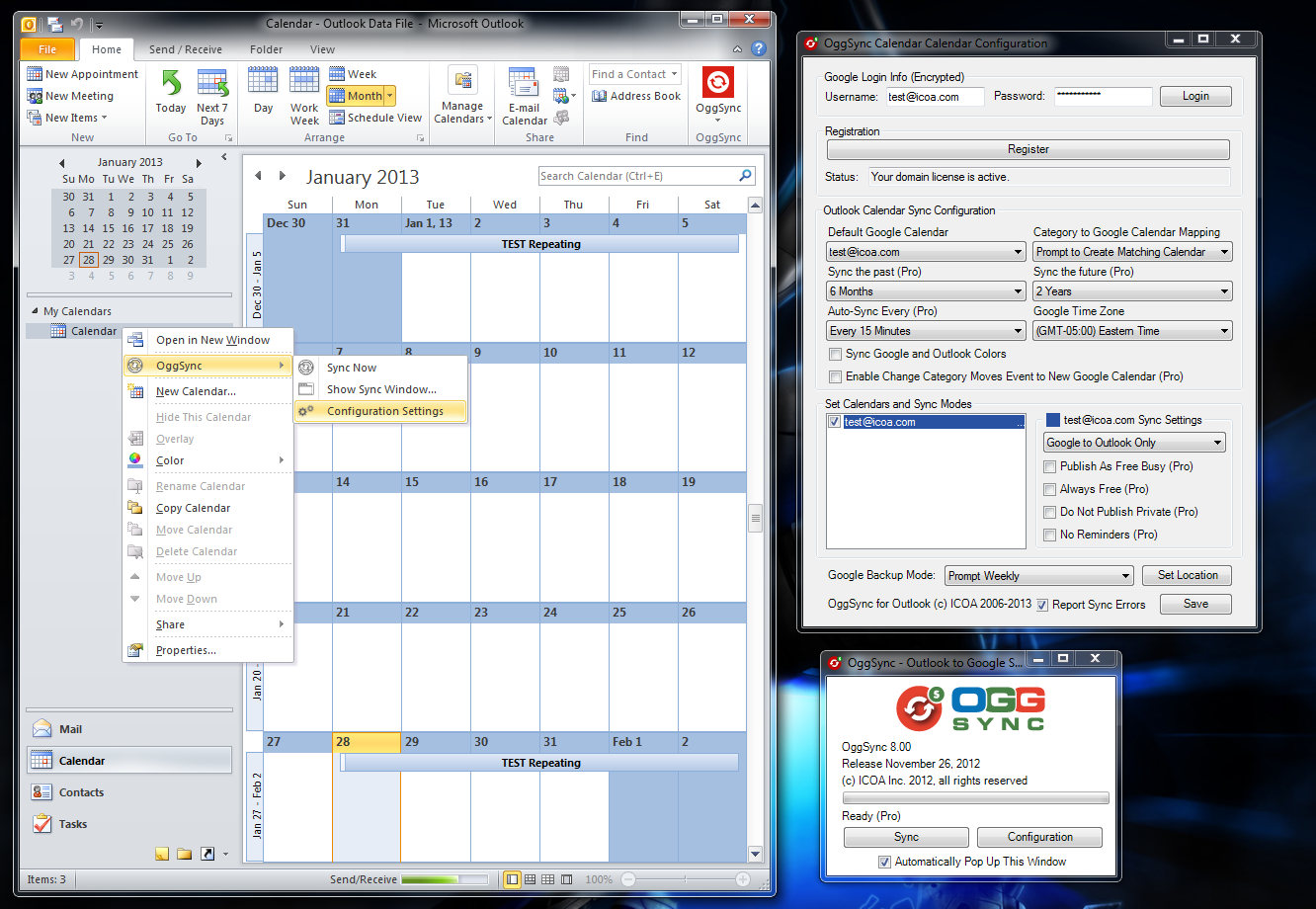
To set up a calendar to sync:
1) Click the “Calendar” in the lower left, that will bring up the list of calendars in the left pane.
2) Choose the calendar you wish to sync and RIGHT CLICK it, you will see an OggSync menu option.
3) Choose that and then choose “Configuration”.
4) Set the configuration options, then choose Sync Window.
5) Press Sync.
An example of the menu is here: image
Q) I’m running Outlook 2010 and keep getting a question about security, what do I do?
If you are running Outlook 2010 you will need to install virus checking software that Outlook detects.
Check:Â File ~ Options ~ Trust Center ~ Trust Center Settings… ~ Programmatic Access
Look for “Antivirus status:Â Valid”
If not I suggest installing Microsoft Security Essentials (free) to get the popup to go away.
Q) If you need to restore your calendar to one of the OggSync backups, how do I proceed?
1) Locate the OggSync backup file you wish to use, unzip the ics files.
2) Click the Add down-arrow button at the bottom of the calendar list on the left side of the page, and select Import Calendar.
3) Click Browse and choose the file that contains your events, then click Open.
4) Select the Google Calendar where you’d like to import events, then click Import.
Q) I’ve installed OggSync for Outlook, but I don’t see it anywhere?
A) OggSync 10 runs inside of Outlook in the toolbar. Please look for the red logo then choose “Configure Sync” in the toolbar.
Q) I’ve already synced with another program, is there anything I should do before syncing with OggSync?
A) Yes, you should completely uninstall the other program. Then you should clear one side or the other of events. For example, if you have synced events from your Device or Outlook to Google, you should clear out the Google calendars BEFORE trying to sync with OggSync. OggSync attempts to identify items synced by other programs, but other programs may do syncs differently and OggSync may think they are new events, and you will get duplicates.
Q) I want to change my sync settings, but the options are grayed out.
A) In order to change your sync settings you must first “unsync” the calendar. Uncheck the calendar where you want to change the settings and do a manual sync. Once the manual sync is completed, you can change the settings and recheck the calendar. Now the next time you sync, the new settings will be applied to the synced events.
Q) I sync, but it doesn’t move any events to Google.
A) For appointments to sync, they must meet the following criteria:
- The must reside in the sync range (trial version is +/- 3 days)
- You must not have a category defined, or if you do and it doesn’t exactly match one of the Google calendars, you must have the “unknown category to default calendar” checkbox checked.
- The calendar/category for that event must be checked.
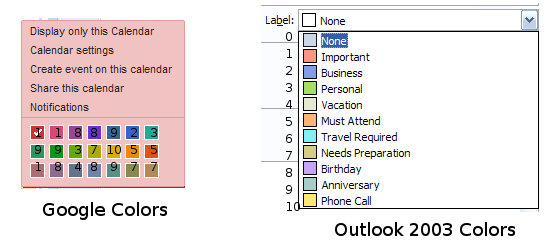
Q) I’m using Outlook 2007 and I’ve checked the “Apply Google Colors” checkbox, why don’t my events use the Google Colors?
A) That feature is for Outlook 2003 only. For Outlook 2007, use the Category settings to set colors for the events synced from Google.
Do the following:
1) Open an appointment that belongs to one of the calendars
2) Click the “Categorize” button across the top
3) highlight the Calendar name in the list of Categories
4) Assign color to that category
At this point all of the items in that calendar will be colored.
Here is a quick guide on how the colors in 2003 get applied:
Q) I’ve downloaded but there is a lot of directories and such, how do I install it?
A) The exe should unzip unto a directory called OggSyncOutlookv3, run the setup.exe program inside of that to install all the required items for OggSync for Outlook.
Q) I see a new version on the web page, or I received a notice of a new version available and I want to upgrade, how do I upgrade?
A) Remove OggSync from the “Add or Remove Programs” section in the “Control Panel” in windows. Then install as if installing fresh. OggSync will remember the settings so you can pick up where you left off.
Q) I want to completely reset OggSync, I’ve uninstalled and reinstalled, but my settings are still there.
A) We do not recommend deleting OggSync’s settings. The are designed to stay around during upgrades. OggSync upgrades will migrate data to the next version, so you should never need to totally reset your sync settings.
However, if you insist, we recommend that you back up your calendars in Outlook and in Google, and also clear out the events in either Outlook or Google (although OggSync will make it’s best effort to match up duplicate entries).
OggSync’s settings are stored here in XP:
C:\Documents and Settings\username\Local Settings\Application Data\Microsoft Corporation\Microsoft Office Outlook\ICOA
For Vista/Windows 7 look here:
C:\Users\username\AppData\Local\Microsoft Corporation\Microsoft Office Outlook\ICOA
Organize (it’s in the menu bar) ~ Folder and Search Options ~ View Tab ~ Advanced Settings ~ Hidden files and folders and make it look as below:
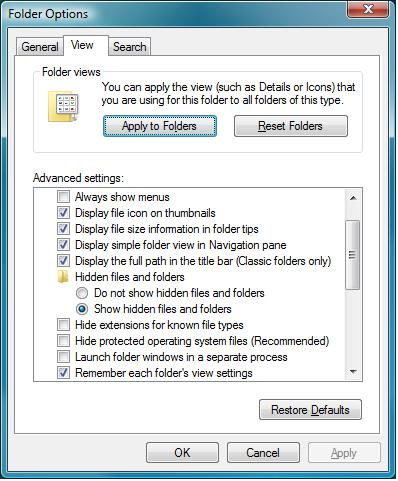
Again, you should really be careful in deleting these settings, and you should back up your calendars.
Q) Can I use ActiveSync, OggSync Mobile and OggSync for Outlook all at the same time?
A) Yes, but you should disable the Calendar sync part of ActiveSync. If you don’t you have created a “Sync Loop” from Google to Outlook to Phone to Google. OggSync can detect this loop and does attempt to recover from it, but that is a failsafe mechanism, and you should disable the Calendar Sync in Activesync to keep things straight.
Q) I have a recurrence pattern, but some of my moved events aren’t showing up.
A) In order for OggSync to sync your exceptions, the exceptions must lie within the sync range.
Q) I keep getting login failed when attempting to log in.
A) Check to see if you have duplicate calendar names, or a non-standard character in one of your calendar names. Also check your proxy settings or your account has been locked. You can unlock your account with this google page:
https://www.google.com/accounts/UnlockCaptcha
Q) I get duplicates when I get invites (as Google automatically adds them to my calendar), how do I keep from getting duplicates?
A) Go to the Google Settings and look for the setting to “Automatically add invitations to my calendar:” Turn this off. If that still doesn’t work, turn it on. Hit save, then turn it off and hit save again.
Q) No matter what I do, I keep getting 0 New and 0/0 Updated messages.
A) Check to make sure your calendars are selected. Make sure you have events with matching categories.
If you have McAfee VirusScan Enterprise “ScriptScan” which scans Javascript and VBscript scripts that are executed by the Windows Scripting Host. WSH is used by Internet Explorer and Outlook. If an unwanted script is detected it is not allowed to execute.” Add Outlook.exe to the allowed programs list (or disable ScriptScan).